


As applications grow, managing state becomes increasingly complex. Without a clear structure, developers can face uncontrolled data flow, difficult debugging, unpredictable behavior, and performance issues. Scattered state across the application makes it hard to track changes and maintain consistency. In this post, we explore state management approaches such as Context, Flux, Redux, and Redux Toolkit (RTK), and how they help create a more scalable and maintainable architecture.
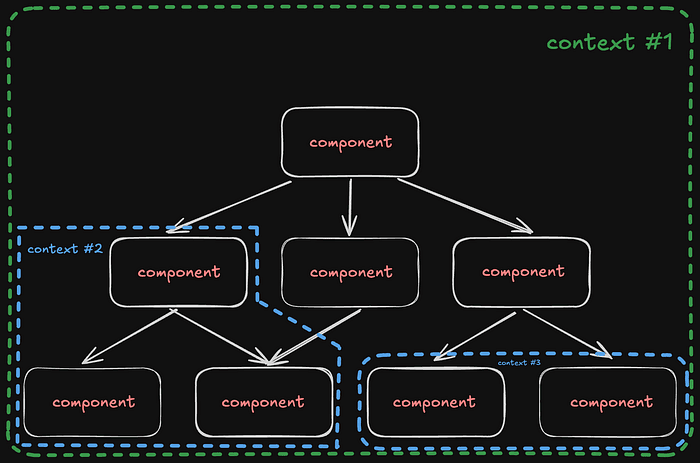
Let’s imagine our application as a tree-like structure, where blocks represent components, and elements inside them represent state. We create components to separate logic, UI, and other concerns. As a result, each component has its own logic and state.
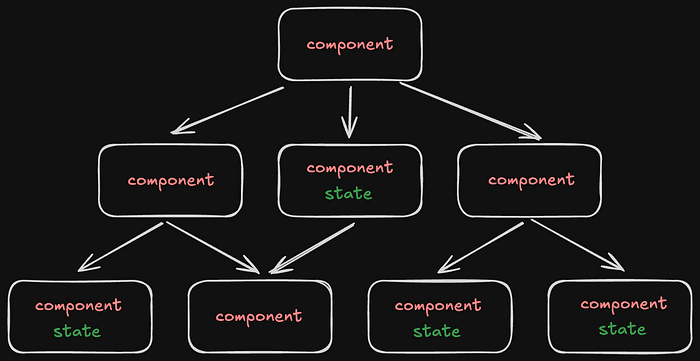
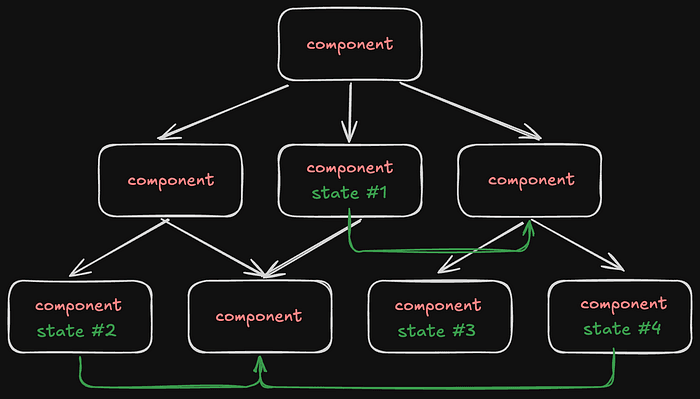
For small applications, this approach works well. Components encapsulate their functionality, and their state remains isolated. However, as the application grows, the need for data sharing between different components — sometimes located in distant branches of the tree — becomes inevitable.
Press enter or click to view image in full size
In React, for example, data is typically passed from parent components to child components using props. But when we need to share data between components that are far apart in the tree, we run into the problem of “prop drilling” — having to pass props through multiple intermediate components that don’t actually need them.
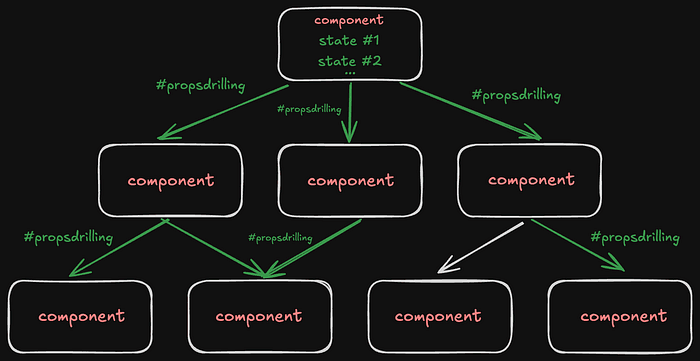
State updates make things even more complicated. If Component A needs to react to changes in Component B, which is located in a completely different part of the tree, managing such interactions becomes a non-trivial task without a centralized state management system.
This is exactly the problem that state management patterns like Flux and its popular implementation, Redux, aim to solve — providing a single, predictable data flow in the application.
Before we dive into how Redux works and what Flux architecture is, we first need to understand React Context.
React Context — is a mechanism that allows us to pass data through the component tree without manually passing props at every level. Context creates a kind of “global” state (or wrapper) for a specific part of the application.
With the Context API, we can create a data store that is accessible to all components in the tree, regardless of their position or nesting. This solves the problem of “prop drilling,” where props have to be passed through multiple intermediate components.
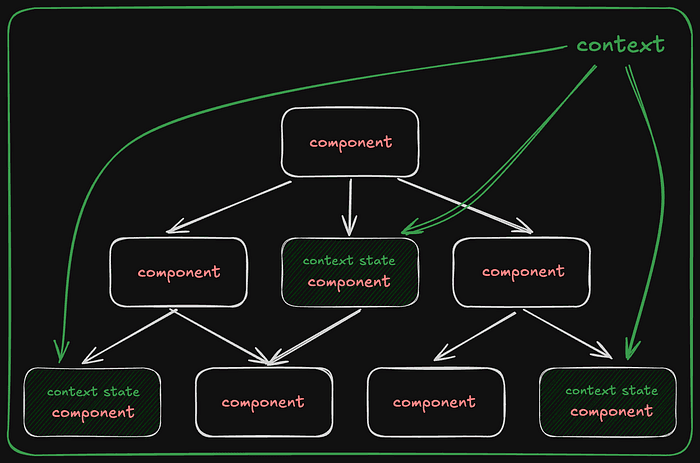
However, while Context is great for providing access to data, it has limitations when it comes to managing state changes:
Flux — is an architectural pattern developed by Facebook for working with React. It ensures a one-way data flow, making the application state more predictable and easier to track.
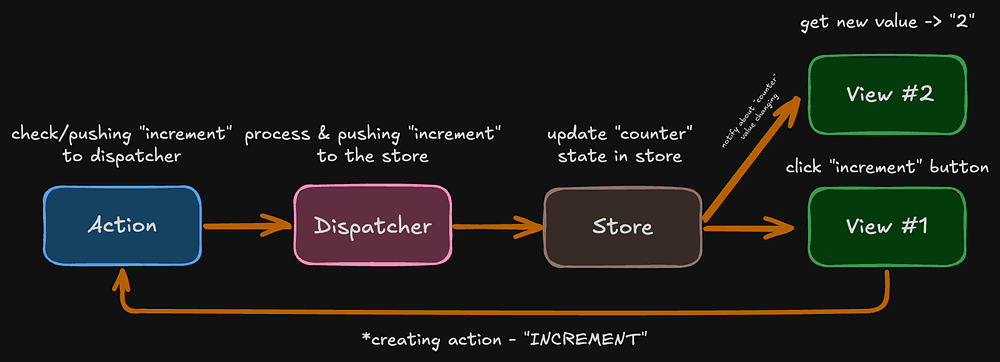
Unlike the familiar Context-based flow, Flux introduces a more structured approach with additional elements:

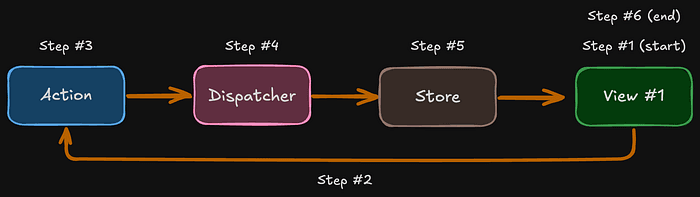
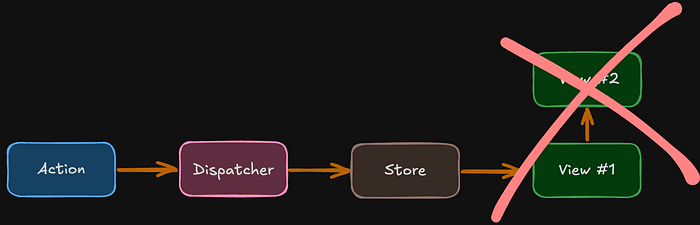
A logical question arises: what if we have multiple Views, and we want to share data from “View #1” with “View #2” ? The answer is simple — we must go through the full cycle of the one-way data flow.
In other words, direct data transfer from View #1 to View #2 is not allowed and will not be used!
Redux is a state management library that implements the Flux architecture.
useState(), where a setter updates the previous state.Let’s go step by step and build a simple application with multiple states.
$ pnpm create vite my-redux-app --template react

$ pnpm create vite
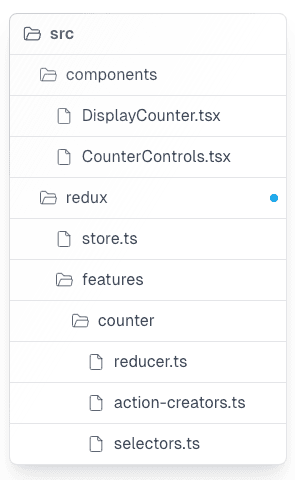
2. Organizing Files
A good practice is to place Redux-related code in a separate folder:
3. Creating the Store
The Store is the heart of Redux — it holds all the application states.
import { combineReducers, createStore } from "redux"
import { counterReducer } from "./features/counter/reducer"

/**
 * Root reducer
 * Combines all application reducers into a single state tree.
 */
const rootReducer = combineReducers({
  /**
   * Counter state slice
   */
  counter: counterReducer,

  /**
   * Theme state slice
   * Temporary static reducer (can be replaced with real reducer later)
   */
  theme: () => "light",
})

/**
 * Redux store
 * Centralized state container for the application.
 */
export const store = createStore(rootReducer)

/**
 * RootState type
 * Represents the complete state shape of the Redux store.
 */
export type RootState = ReturnType<typeof rootReducer>
Unlike React Context, where you can create multiple separate contexts for different parts of the state, Redux uses a single store for all states.
4. Connecting Redux to the Application
import React from 'react'
import { createRoot } from 'react-dom/client'
import { Provider } from 'react-redux'
import { store } from './redux/store'
import App from './App'

createRoot(document.getElementById('root')!).render(
  <React.StrictMode>
    <Provider store={store}>
      <App />
    </Provider>
  </React.StrictMode>
)
Just like with React Context, we need to wrap our application in a Provider and pass the store we created earlier as a prop. Key concepts from the store:

Press enter or click to view image in full size
getState function, which might return something like { counter: 1, theme: "light" }.A Reducer is a pure function that takes the current state and an action, then returns a new state.
/**
 * Define the action types (using enums as well)
 */
export enum CounterActionType {
  INCREMENT = "INCREMENT",
  DECREMENT = "DECREMENT",
}

/**
 * Types for actions
 */
export interface IncrementAction {
  type: CounterActionType.INCREMENT
}

export interface DecrementAction {
  type: CounterActionType.DECREMENT
}

export type CounterAction = IncrementAction | DecrementAction

/**
 * Action Creators
 */
export function incrementCounter(): IncrementAction {
  return { type: CounterActionType.INCREMENT }
}

export function decrementCounter(): DecrementAction {
  return { type: CounterActionType.DECREMENT }
}
Important: A reducer must always return a new state and should never modify the existing one. A reducer must have a default value for the initial state. Otherwise, we may encounter an error like:
Uncaught Error: The slice reducer for key "counter" returned undefined during initialization.
If the state passed to the reducer is undefined, you must explicitly return the initial state.
The initial state may not be undefined. If you don't want to set a value for this reducer, you can use null instead of undefined.
Finally, don’t forget to import the reducer into our store.
import { combineReducers, createStore } from "redux"
import { counterReducer } from "./features/counter/reducer"

const rootReducer = combineReducers({
  counter: counterReducer, // replace instead of `() => 1`
  theme: () => 'light'

export const store = createStore(rootReducer)

export type RootState = ReturnType<typeof rootReducer>
6. Creating Selectors
We will create two components:
DisplayCounter — Displays the current counter value.CounterControls — Contains buttons to increase or decrease the counter.First, we define the counterSelector function and pass it into the useSelector(counterSelector) hook.
Selectors are functions that extract specific data from the state.
import { RootState } from "../../store"

// Selector to get the counter value
export const counterSelector = (state: RootState) => state.counterimport { useSelector } from "react-redux"
import { counterSelector } from "../redux/features/counter/selectors"
export const DisplayCounter = () => {
/**
* useSelector subscribes to changes in the store
* and returns the right part of the state
*/
const counter = useSelector(counterSelector)
return <div>Counter value: {counter}</div>
}7. Defining Actions
In the CounterControls component, we update the state using the useDispatch(incrementCounter()) hook.
Actions are simple objects with a type field that describes what happened in the application. For example, our action types will be:
"INCREMENT""DECREMENT"/**
* Define the action types (using enums as well)
*/
export enum CounterActionType {
INCREMENT = "INCREMENT",
DECREMENT = "DECREMENT",
}
/**
* Types for actions
*/
export interface IncrementAction {
type: CounterActionType.INCREMENT
}
export interface DecrementAction {
type: CounterActionType.DECREMENT
}
export type CounterAction = IncrementAction | DecrementAction
/**
* Action Creators
*/
export function incrementCounter(): IncrementAction {
return { type: CounterActionType.INCREMENT }
}
export function decrementCounter(): DecrementAction {
return { type: CounterActionType.DECREMENT }
}// src/components/CounterControls.tsx
import { useDispatch } from "react-redux"
import {
decrementCounter,
incrementCounter,
} from "../redux/features/counter/actions"
export const CounterControls = () => {
/**
* useDispatch returns the dispatch function to send actions to the store
*/
const dispatch = useDispatch()
/**
* Create actions using action creators
*/
const increment = incrementCounter()
const decrement = decrementCounter()
/**
* Handler functions for buttons
*/
const onIncrement = () => dispatch(increment)
const onDecrement = () => dispatch(decrement)
return (
<div className="flex items-center space-x-2">
<button
className="px-5 py-2 border rounded-lg"
onClick={onIncrement}
>
+1
</button>
<button
className="px-5 py-2 border rounded-lg"
onClick={onDecrement}
>
-1
</button>
</div>
)
}8. Using Redux in the Application
Once everything is set up, we can integrate Redux into our app and see how the state updates in action!
import { DisplayCounter } from './components/DisplayCounter'
import { CounterControls } from './components/CounterControls'

export default function App() {
  return (
    <div className="App">
      <h1>My Redux Counter</h1>
      <DisplayCounter />
      <CounterControls />
    </div>
  )
}Let’s break down what happens when a user clicks the “+1” button:
onIncrement function is triggered, which dispatches an action: { type: “INCREMENT” }counterReducer, since the action is related to the counter state.counterReducer detects the "INCREMENT" action type and returns a new state (state + 1).useSelector(counterSelector) receive a notification about the state change.DisplayCounter component re-renders with the updated counter value.This is the one-way data flow in Redux!
To better understand Redux, imagine it as an emergency response system:
Redux is especially useful when:
Now You Know Redux! As you can see, by breaking it down into parts and gradually implementing it into your application — plus adding some automation — you can make your app more reliable and free from unnecessary complexities!